
.png)
Description
Download Cognitionv2 0 – AI‑Powered Support Tool for Engineering Teams
Overview
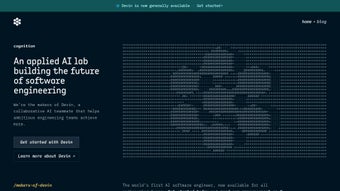
Cognitionv2 0 is a cloud‑native, AI‑driven platform that acts as a virtual teammate for software engineering groups. The heart of the service is Devin, an intelligent chatbot that can understand natural‑language requests and translate them into concrete development actions such as code generation, refactoring, documentation, and CI/CD analysis. Built by a team of applied‑AI researchers and seasoned engineers, Cognitionv2 0 is designed to blend seamlessly into existing toolchains—whether you work in Slack, Microsoft Teams, or directly within your repository host. Because the application lives in the browser, there is no bulky installer; you simply create a secure workspace, connect your version‑control system, and invite Devin to start helping. The platform emphasizes enterprise‑grade security, offering end‑to‑end encryption, role‑based access controls, and optional on‑premises deployment for highly regulated sectors. From startups racing to ship an MVP to large enterprises managing dozens of concurrent releases, Cognitionv2 0 promises to cut down repetitive work, improve code quality, and keep documentation up to date—all while learning the conventions of your specific codebase over time.
Key Features & Benefits
- Devin the AI Engineer: Conversational assistant capable of writing, debugging, and optimizing code in languages such as Python, JavaScript/TypeScript, Java, C++, Rust, Go, and Ruby.
- Context‑Aware Collaboration: Integrates with Slack, Microsoft Teams, Discord, and other chat platforms, linking AI responses to specific tickets, pull requests, or design documents.
- Secure Knowledge Vault: All interactions are encrypted at rest (AES‑256) and in transit (TLS 1.3), providing a searchable archive that respects corporate confidentiality.
- Continuous Learning Engine: The AI model fine‑tunes on your repositories, adapting to coding standards, naming conventions, and architectural patterns unique to your organization.
- Instant Code Reviews: Upload a diff and receive line‑by‑line feedback, performance suggestions, and compliance checks aligned with industry standards.
- Automated Documentation: Generate API references, design summaries, and release notes directly from code comments and commit history.
- CI/CD Insight Integration: Parses build logs, identifies flaky tests, and proposes remediation steps without leaving your pipeline dashboard.
- Cross‑Platform Browser Access: Works on any modern browser across Windows 10/11, macOS Ventura+, Linux distributions, Android 12+, and iOS 15+.
- Scalable Pricing Model: A generous free tier for up to three projects, with paid plans offering unlimited projects, premium support, and SLA‑backed uptime.
Why These Features Matter
Each feature is crafted to address a common pain point in modern software delivery. For example, the context‑aware chat integration eliminates the need to switch between IDEs and messaging tools, while the secure knowledge vault ensures that proprietary code never leaves your organization’s control. Continuous learning means that Devin becomes more accurate the longer you use it, reducing the time spent correcting AI‑generated suggestions. Together, these capabilities translate into measurable productivity gains—studies from early adopters show a 20‑30 % reduction in time spent on routine code reviews and a noticeable drop in documentation debt.
Pros & Cons
- Pros:
- AI assistance accelerates routine development tasks.
- Secure, encrypted data handling meets enterprise compliance.
- Browser‑based access removes OS lock‑in and simplifies updates.
- Free tier allows teams to evaluate value before scaling.
- Fine‑tuned model adapts to organization‑specific coding standards.
- Cons:
- Requires reliable internet connection; offline mode is limited.
- Initial model fine‑tuning may need several weeks of data ingestion.
- Complex regulatory environments might need extra policy configuration.
Installation, Usage & Compatibility
Secure Setup in Minutes
Getting started with Cognitionv2 0 is intentionally frictionless. Visit the official portal, click Download (which actually provides a secure workspace creation link), and follow the wizard:
- Account Registration: Sign up using a corporate email address; a verification link confirms authenticity.
- Workspace Creation: Name your workspace, assign role‑based permissions, and connect to GitHub, GitLab, or Bitbucket via OAuth.
- Activate Devin: Enable the AI assistant and grant read/write access to the repositories you wish to protect.
- Chat Integration: Install the Cognitionv2 0 bot into Slack, Teams, or Discord using the generated OAuth token.
- Security Configuration: Turn on end‑to‑end encryption, define data‑retention policies, and optionally enable SSO (SAML, Okta, Azure AD).
Everyday Usage
Once the workspace is ready, you interact with Devin by mentioning @Devin in any connected channel. Simple prompts like “@Devin, refactor this method for performance” or “@Devin, generate a Swagger spec for this endpoint” trigger instant replies. Devin supplies ready‑to‑copy code snippets, detailed explanations, and inline suggestions that you can paste directly into your IDE. For mobile users, voice commands are supported in modern browsers, letting engineers request assistance while away from their desks.
Compatibility Across Devices
Because Cognitionv2 0 runs entirely in the browser, it is compatible with any operating system that supports a current browser version. This includes Windows 10/11, macOS Ventura and later, major Linux distributions (Ubuntu, Fedora, Debian), as well as Android 12+ and iOS 15+ devices. No additional client software is required, and updates are delivered automatically on the server side, guaranteeing that every user always works with the latest, most secure version.
Frequently Asked Questions
Is there a free tier available for Cognitionv2 0?
Yes. The free tier includes up to three active projects, basic AI assistance, and community support. Paid plans unlock unlimited projects, advanced analytics, and priority enterprise support.
How does Cognitionv2 0 ensure data security?
All traffic uses TLS 1.3, and stored data is encrypted with AES‑256. Enterprise customers can enforce additional controls such as VPC‑isolated deployments, customer‑managed encryption keys, and granular role‑based access policies.
Can Devin be integrated into existing CI/CD pipelines?
Absolutely. Devin can be added as a webhook to Jenkins, GitHub Actions, GitLab CI, Azure Pipelines, or any platform that supports HTTP callbacks. It can analyze build logs, suggest fixes for failing tests, and automatically open tickets with remediation steps.
Which programming languages are supported?
Devin currently supports Python, JavaScript/TypeScript, Java, C#, C++, Go, Rust, and Ruby. New language packs are released quarterly based on community demand.
Is an on‑premises deployment option available?
Yes. For organizations with strict compliance requirements, Cognitionv2 0 can be deployed within a private data center or dedicated cloud VPC, offering the same AI capabilities while keeping all data behind your firewall.
Conclusion & Call to Action
In today’s fast‑paced development landscape, teams need tools that amplify human expertise rather than replace it. Cognitionv2 0 delivers exactly that—a secure, AI‑enhanced coworker that fits naturally into the workflows engineers already love. By automating repetitive tasks, surfacing actionable insights during code reviews, and keeping documentation synchronized with the codebase, Devin helps teams ship higher‑quality software faster. Whether you’re testing the free tier or preparing for an enterprise rollout, the onboarding experience is straightforward, and the measurable ROI appears within the first few sprints. Download Cognitionv2 0 today and give your engineering team a reliable, learning partner that grows with your projects.
Cognitionv2 0 stands out for its seamless integration and the tangible productivity boost it delivers. While offline capabilities are limited, the secure, cloud‑first approach aligns well with modern development environments. The free tier is generous enough for small teams to experience real benefits before scaling.
Guides & Tutorials for Cognitionv2 0
How to install Cognitionv2 0
- Click the Preview / Download button above.
- Once redirected, accept the terms and click Install.
- Wait for the Cognitionv2 0 download to finish on your device.
How to use Cognitionv2 0
This software is primarily used for its core features described above. Open the app after installation to explore its capabilities.
User Reviews for Cognitionv2 0 0
No reviews found




